Side Job / Education AI
PaperGrade · Teacher Assessment Assistant
A side job project for teacher assessment and review, combining a Web interface, Windows wrapper, bilingual UI, PDF evidence, and Word / Excel delivery.
- Project scope
- Web + Windows assessment and review
- Current status
- In active development
- My role
- Product design and development
Technology
- React
- TypeScript
- Node.js
- Electron
- SQLite
- PDF.js
- MinerU
What it solves
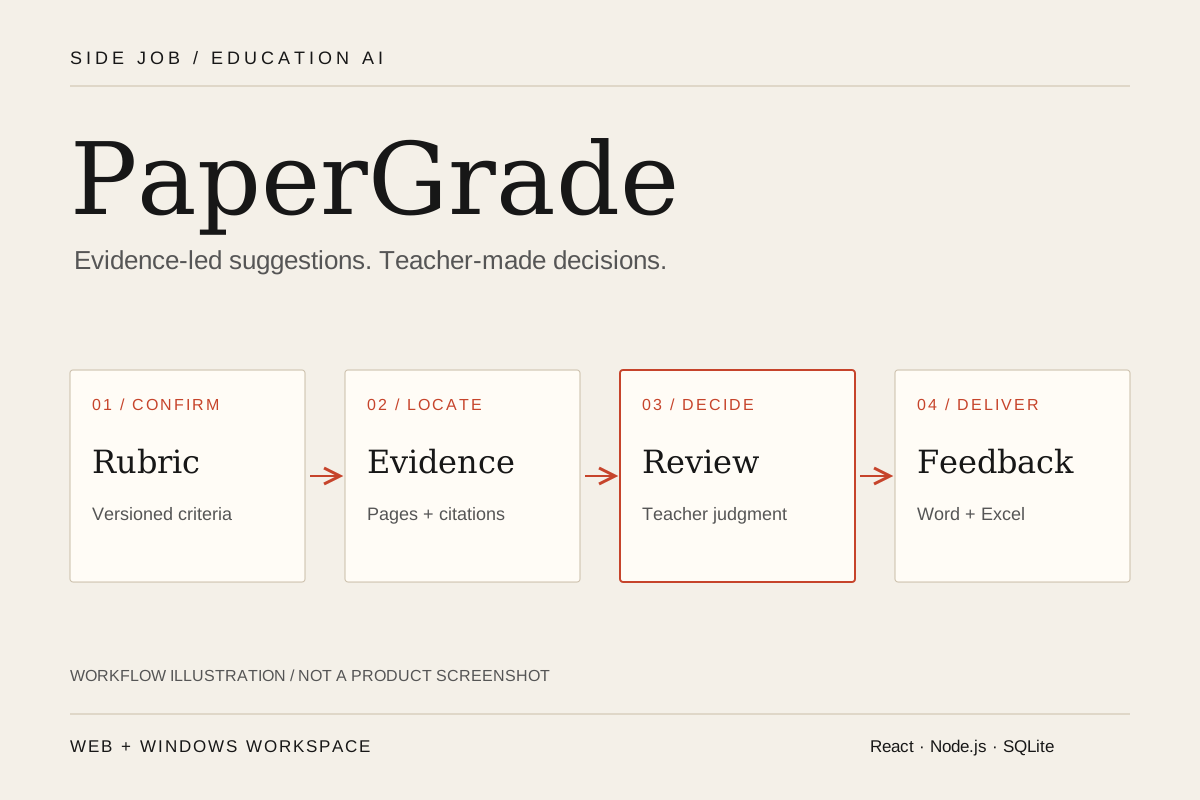
PaperGrade is my side job project, focused on teacher assessment and review. Batch assessment requires teachers to reconcile a rubric, source evidence, item-level judgment, and student feedback. The current Web version and Windows wrapper organize those steps into one workflow: teachers confirm a rubric, parse papers, inspect evidence-backed suggestions against the original pages, resolve review items, choose final scores, and export feedback alongside a separate teacher review record.
Core capabilities
- Extract a rubric from PDF and confirm its version
- Import papers in batches and locate text, table, and figure evidence
- Generate item-level scores, suggested ranges, and reasons
- Review original pages while retaining human edits and AI history
- Switch between Chinese and English UI with separate report language settings
- Download student Word feedback and batch Excel summaries
How it works
- Confirm a rubric and create a batch
- Import PDFs and parse evidence
- Generate suggestions and review original pages
- Confirm final results and export feedback
The Windows wrapper starts a local service and opens the interface without a separate Node.js installation. The browser version connects to the same business layer on its service computer. Both support use without login and a remembered Chinese/English UI preference; interface, feedback, and export languages are separate, and switching the UI does not reassess papers. Inputs are PDFs up to 50MB / 100 pages each, with up to 50 papers per batch; Word files need PDF conversion first.
Each batch fixes its rubric and model configuration. Closing a browser does not stop the server queue. Stopping the service leaves unfinished work retryable after restart. Reassessment creates a separate version while confirmed results and earlier suggestions remain available.
Project highlights
Connect scoring decisions to source evidence
PDF.js displays original pages while MinerU produces content blocks with page numbers and locations. Assessment locates evidence per rubric item and checks structure, score bounds, and references. Relevant figures receive model analysis when further interpretation is needed. Citation mismatches, location issues, and uncertain visual evidence become teacher review items; missing valid model output never becomes an invented score.
Current assessment requests concern the submitted paper alone: other papers, official reference scores, reference-example content, and historical scores are excluded. Teacher additions require explicit confirmation; AI cannot enable exceptions on its own.
Support teacher judgment with reasoned score ranges
The current workflow retains the 0.2.7 range rules, including lower and upper bounds and reasons for each item. The recommended score uses the valid lower bound, with score ordering and rubric limits checked by the program. Teachers can choose a bound or make a manual change within the rubric’s permitted range. Switching scores makes no model call, and the original AI suggestion and range remain recorded. The range represents defensible judgments about the submitted evidence, not a statistical confidence interval.
Keep review history distinct from student deliverables
SQLite and files on the service computer retain rubric versions, parsing artifacts, assessment runs, and teacher edits. Unreviewed Word exports identify teacher review content; confirmed student Word feedback contains final scores and feedback. The teacher Excel sheet retains AI suggestions, ranges, and checks. Web exports appear in a download list. Bilingual paper and algorithm summaries can be added independently, and failed reports retried without reassessing papers.
System architecture
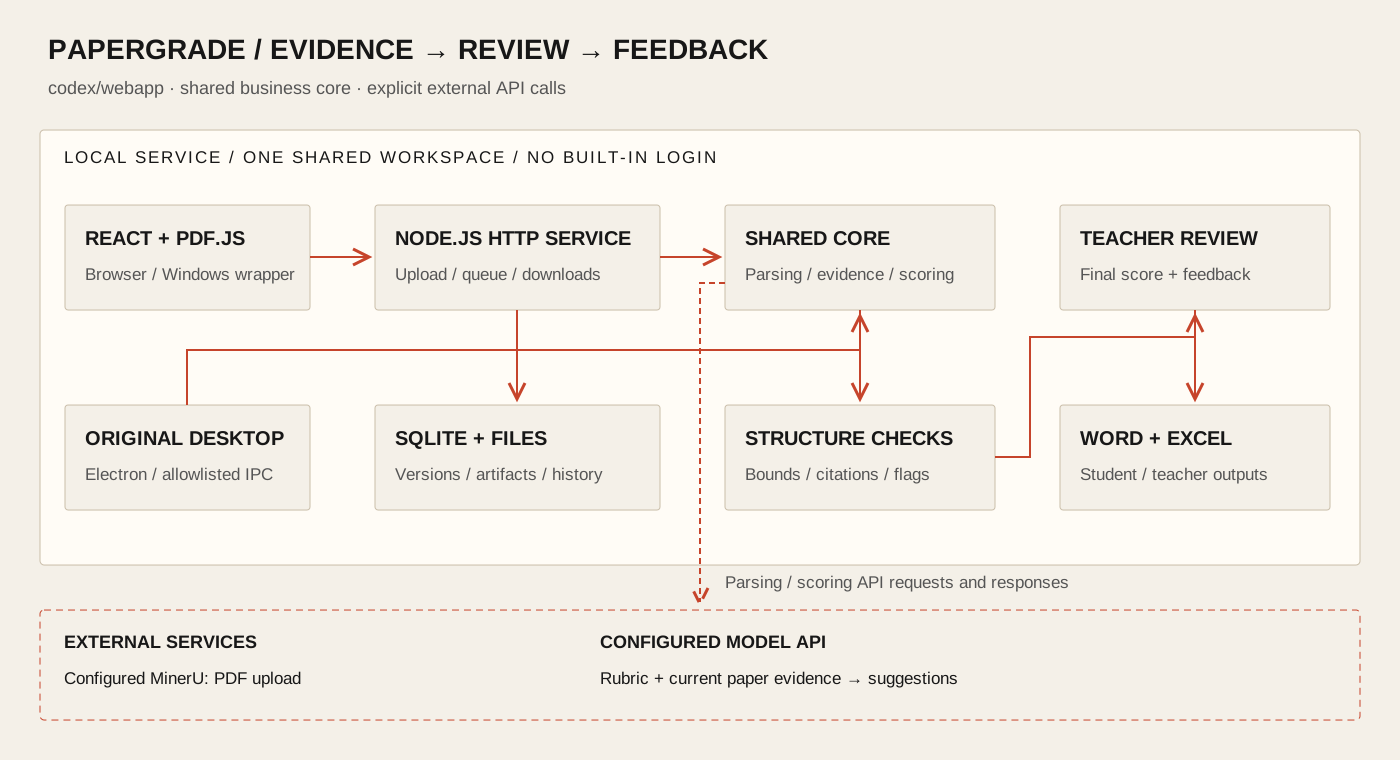
The Web interface uses HTTP to reach shared parsing, assessment, review, and export services. The original Electron desktop entry continues through restricted IPC. The Windows Web wrapper embeds a local service and stops it when its window closes. Web credentials use AES-256-GCM encryption and saved values are not returned to the browser; the original desktop version retains Electron system secure storage.
Papers, parsing artifacts, and assessment records stay on the service computer. PDFs are uploaded to configured MinerU, while model requests send the rubric and relevant evidence from the current paper. Local storage does not imply offline processing.
Project scope
This teacher-assistance tool is in active development. Source code is private and no installer is published here. Each Web service has one shared workspace without built-in authentication, defaults to local-only access, and has no public deployment. The recorded 123 regression tests and offline Windows Sandbox installation primarily use synthetic material and simulated external APIs; they do not establish Web live-service or scoring-quality acceptance. Blank-page handling, model-format errors, and scoring calibration remain known limits. Historical Mac trial builds do not include the current Web additions. Teachers confirm final grades; the program does not automatically send feedback or write to school grading systems.